
- Given user defined object or POJO, we would like to serialize object in java.
- We will use Externalizable interface, so that class is marked for Serialization.
- Externalizable interface is sub interface of Serializable interface.
- We have discussed similar posts:
- Serialize user defined object using Serializable interface.
- Impact of inheritance on Serialization, when Base class is Serialization.
- Impact of inheritance on Serialization, when Concrete class is Serialization.
1. Serialization & Deserialization using Externalizable interface in java
The Externalizable interface has following methods.
public interface Externalizable extends java.io.Serializable {
    void writeExternal(ObjectOutput out) throws IOException;
    void readExternal(ObjectInput in) throws IOException, ClassNotFoundException;
}
- We will discuss the serialization & deserialization of user defined object with the help of example.
- User defined object shall implements Externalizable interface.
- We will have a Person class, which we want to serialize using Externalizable interface.
2. Class hierarchy of Person class (implementing Externalizable interface)
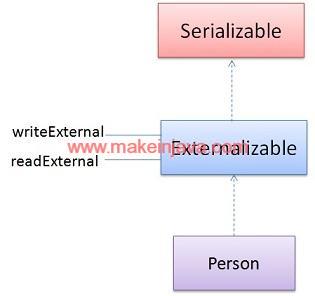
3. POJO or User defined class (Person)
- We will mark lastName as static variable
- We will mark contact data member as transient variable.
- If we implements Externalizable interface, then we can serialize static and transient variables.
- Customize serialization using writeExternal method of Externalizable interface.
- Read serialized object using readExternal method of Externalizable interface.
- The Person class needs to have default constructor.
4. Person class or POJO implementing Externalizable interface.
package org.learn;

import java.io.Externalizable;
import java.io.IOException;
import java.io.ObjectInput;
import java.io.ObjectOutput;

public class Person implements Externalizable {

	private static final long serialVersionUID = 1L;
	public String firstName;
	public static String lastName = "Not Set";
	public int age;
	public transient String contact;

	public Person() {

	}

	public Person(String firstName, int age, String contact) {
		this.firstName = firstName;
		this.age = age;
		this.contact = contact;
	}

	public String toString() {
		return "[" + firstName + " " + lastName + " " + age + " " + contact + "]";
	}

	@Override
	public void writeExternal(ObjectOutput out) throws IOException {
		out.writeObject(firstName);
		out.writeObject(lastName);
		out.writeInt(age);
		out.writeObject(contact);
	}

	@Override
	public void readExternal(ObjectInput in) throws IOException, ClassNotFoundException {
		firstName = (String) in.readObject();
		lastName = (String) in.readObject();
		age = (int) in.readInt();
		contact = (String) in.readObject();
	}
}
5. Serialize and Deserialize methods of Person class
- serialize method will serialize the person object.
- We will serialize static variable in write
- Serialize static variable using writeExternal method in Person class.
- Person.lastName = “harvey”;
- Set before serialization
- We will serialize static variable in write
- deSerialize method will de-serialize the Person Object.
- We will get serialized properties of Person object.
- Static and non static variables will be deserialized.
- We will get serialized properties of Person object.
6. Program – Serialization & deserialization of user defined object in java.
package org.learn;

import java.io.File;
import java.io.FileInputStream;
import java.io.FileOutputStream;
import java.io.IOException;
import java.io.ObjectInputStream;
import java.io.ObjectOutputStream;

public class SerializeDeserialize {

	public static void serialize() throws IOException {
		Person person = new Person("Mike", 34, "001894536");
		//Set static variable
		Person.lastName = "harvey";
		FileOutputStream output = new FileOutputStream(new File("savePerson.txt"));
		ObjectOutputStream outputStream = new ObjectOutputStream(output);
		outputStream.writeObject(person);
		outputStream.flush();
		outputStream.close();

		System.out.println("1. Serialized the person object : ");
		System.out.println(person);
		System.out.println("LastName:"+Person.lastName);
	}
	public static void deSerialize() throws IOException, ClassNotFoundException {

		FileInputStream inputStream = new FileInputStream(new File("savePerson.txt"));
		ObjectInputStream objectInputStream = new ObjectInputStream(inputStream);
		Person person = (Person) objectInputStream.readObject();
		inputStream.close();

		System.out.println("\n2. Deserialized person object : ");
		System.out.println(person);
		System.out.println("LastName:"+Person.lastName);
	}

	public static void main(String[] args) throws IOException, ClassNotFoundException {
		serialize();
		deSerialize();
	}
}
Download example – Serialization object in java externalizable interface