- Scanner is text parser which used to parse primitives & strings using regular expression.
- Scanner split the input into token using delimiter pattern.
- Default pattern delimiter is whitespace.
- We will write content to a file using FileWriter class.
- Then, we will read content from as file using Scanner class.
- Scanner class extends object & implements Closeable & Iterable interface.
Scanner class hierarchy is as follows:
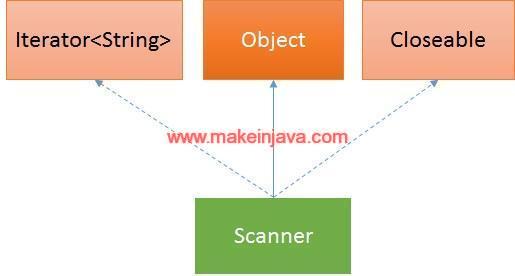 Fig: Scanner class hierarchy
Scanner class constructors (Java IO):
| No. | Constructors |
Description |
|---|
| 1 | Scanner(File source) |
Constructs a new Scanner that produces values scanned from the specified file. |
| 2 | Scanner(File source, String charsetName) |
Constructs a new Scanner that produces values scanned from the specified file. |
| 3 | Scanner(InputStream source) |
Constructs a new Scanner that produces values scanned from the specified input stream. |
| 4 | Scanner(InputStream source, String charsetName) |
Constructs a new Scanner that produces values scanned from the specified input stream. |
| 5 | Scanner(Path source) |
Constructs a new Scanner that produces values scanned from the specified file. |
| 6 | Scanner(Path source, String charsetName) |
Constructs a new Scanner that produces values scanned from the specified file. |
| 7 | Scanner(Readable source) |
Constructs a new Scanner that produces values scanned from the specified source. |
| 8 | Scanner(ReadableByteChannel source) |
Constructs a new Scanner that produces values scanned from the specified channel. |
| 9 | Scanner(ReadableByteChannel source, String charsetName) |
Constructs a new Scanner that produces values scanned from the specified channel. |
| 10 | Scanner(String source) |
Constructs a new Scanner that produces values scanned from the specified string. |
Important methods of Scanner class (Java IO):
| No. | Methods |
Description |
|---|
| 1 | boolean hasNext() |
Returns true if this scanner has another token in its input. |
| 2 | boolean hasNextDouble() |
Returns true if the next token in this scanner's input can be interpreted as a double value using the nextDouble() method. |
| 3 | boolean hasNextFloat() |
Returns true if the next token in this scanner's input can be interpreted as a float value using the nextFloat() method. |
| 4 | boolean hasNextInt() |
Returns true if the next token in this scanner's input can be interpreted as an int value in the default radix using the nextInt() method. |
| 5 | String next() |
Finds and returns the next complete token from this scanner.. |
| 6 | String nextLine() |
Moves scanner position to the next line & returns the value as a string. |
| 7 | byte nextByte() |
Scans the next token of the input as a byte. |
| 8 | short nextShort() |
Scans the next token of the input as a short. |
| 9 | int nextInt() |
Scans the next token of the input as a short. |
| 10 | long nextLong() |
Scans the next token of the input as a long. |
| 11 | float nextFloat() |
Scans the next token of the input as a float. |
| 12 | double nextDouble() |
Scans the next token of the input as a double. |
Program: Write file & read file in java using Scanner class (example)
package org.learn.io.scan;

import java.io.FileReader;
import java.io.FileWriter;
import java.io.IOException;
import java.util.Scanner;

public class ReadFileUsingScanner {

    public static void main(String[] args) throws IOException {
        //Write content to file
        writeFileContents();
        //Reading content of file using Scanner class
        readFileContents();
    }

    private static void writeFileContents() throws IOException {

        try (FileWriter fileWriter = new FileWriter("info.txt")) {
            fileWriter.write("10 ");
            fileWriter.write("20.5 ");
            fileWriter.write("Employee ");
            fileWriter.write("50.00 ");
            fileWriter.write("Coffee");
        }
    }

    private static void readFileContents() throws IOException {
        System.out.println("Reading contents of file using Scanner class:");
        try (FileReader fileReader = new FileReader("info.txt");
                Scanner scanner=new Scanner(fileReader)){
            while (scanner.hasNext()) {
                if(scanner.hasNextInt()) {
                    System.out.println(scanner.nextInt());
                } else if(scanner.hasNextDouble()) {
                    System.out.println(scanner.nextDouble());
                } else if(scanner.hasNext()) {
                    System.out.println(scanner.next());
                }
            }
        }
    }
}
Output: Read file in java using Scanner class (example)
Reading contents of file using Scanner class:
10
20.5
Employee
50.0
Coffee
