

What we will discuss in current post?
- What is thread pool
- Application of a single thread pool.
- Application in a read world.
- Application in a enterprise world .
- Write a program to create single thread pool using executor framework.
- Create single thread pool using Executors.newFixedThreadPool(1) & Executors. newSingleThreadExecutor()
What is a thread pool ?
Thread pool is collection of threads, which are created to complete certain tasks. We will create a single thread pool using executor framework. The interaction between thread pool and task is as follows:
- Create a thread Pool containing single thread.
- Create MyTask by implementing Runnable interface.
- Create four MyTasks and assign to single thread pool executor.
- Thread pool will finish task one after another.
- All four task will be executed serially. (i.e. 1 to 4)
Applications of a single thread pool executor?
1. Applications in a real world:
- We can use the single thread executor, when we would like to execute tasks one after another.
- E.g. in our day to day activities, some time, we want the tasks to be executed in fixed order.
- As shown in Fig 1, we want to execute task in fixed order.
- We can use single thread pool executor, to achieve it.
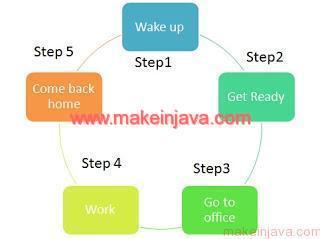
2. Applications in a enterprise world:
- In enterprise applications, some times we have the background jobs, where tasks are to be executed one after another.
- e.g. raising some events, then
- sending notifications, then
- acknowledging a record in a database.
- In such a scenarios, we can use single thread pool executor ( to execute tasks serially).
Program: single thread pool using executor framework in java.
package org.learn;

import java.util.concurrent.ExecutorService;
import java.util.concurrent.Executors;

class MyTask implements Runnable {
	private String name;

	public MyTask(String name) {
		this.name = name;
	}

	public void run() { // Start of step 4
		System.out.println("Start executing " + name);
		try {
			Thread.sleep(1000);
			System.out.println("Executing " + name);
		} catch (InterruptedException e) {
			// skipping the catch as of now
			e.printStackTrace();
		}
		System.out.println("Finished execution " + name);
		System.out.println();
	} /// End of step 4
}

public class SingleThreadPool {
	public static void main(String[] args) {
		// Step No 1
		ExecutorService executor = Executors.newSingleThreadExecutor();
		for (int number = 0; number < 4; number++) {
			// Step No 2
			Runnable worker = new MyTask("MyTask " + number);
			// Step No 3
			executor.execute(worker);
		}
		executor.shutdown();

		// Waiting for all thread to finish
		while (!executor.isTerminated())
			;
		System.out.println("All threads finished");
	}
}
Output: single thread pool using executor framework in java
Start executing MyTask 0
Executing MyTask 0
Finished execution MyTask 0

Start executing MyTask 1
Executing MyTask 1
Finished execution MyTask 1

Start executing MyTask 2
Executing MyTask 2
Finished execution MyTask 2

Start executing MyTask 3
Executing MyTask 3
Finished execution MyTask 3

All threads finished
Executors.newFixedThreadPool(1) & Executors. newSingleThreadExecutor()
- We can create single pool executor using Executors.newFixedThreadPool(1) & Executors. newSingleThreadExecutor()
- In both the cases, thread pool with single thread will be created
- i.e. there will be single thread in the thread pool
- Tasks will be executed using single thread only.
- In newSingleThreadExecutor, there will be only one thread in a thread pool during its life cycle.
- But in case of newFixedThreadPool(1), we can increase the number of threads.
- If at any point of time we would like to increase the threads in thread pool.
- We can increase by specifying the pool size.
- ((ThreadPoolExecutor)fixedThreadPool).setMaximumPoolSize(5);
- In newSingleThreadExecutor(), sequential execution of task is guaranteed.